
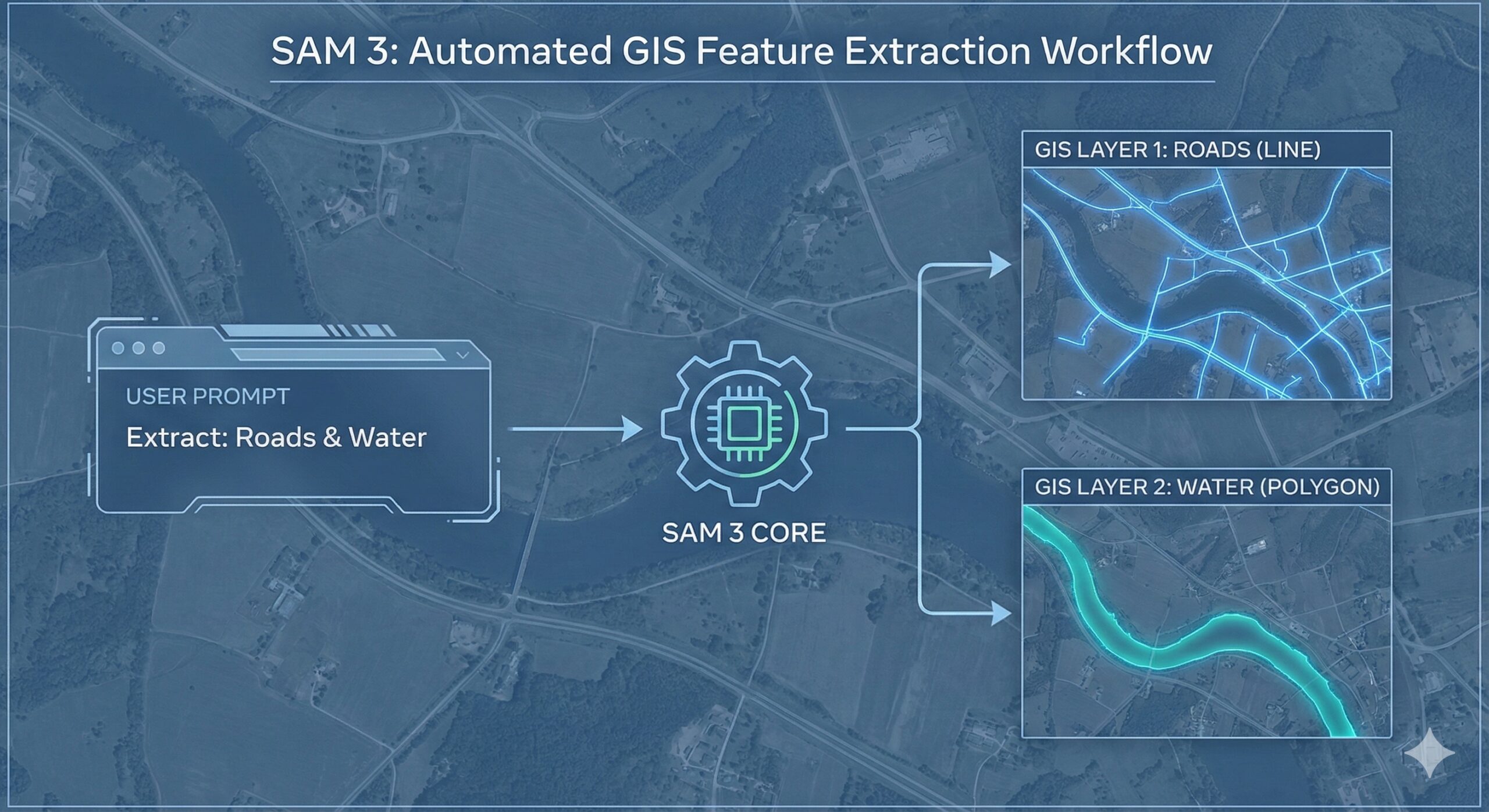
Meta’s Segment Anything Model 3 (SAM 3) represents a significant leap forward in automated feature extraction from imagery, and it has enormous implications for GIS professionals. This latest foundation model transforms how we can extract object-level data from aerial, satellite, and drone imagery—moving from labor-intensive manual digitizing to prompt-based, AI-assisted workflows.
What Makes SAM 3 Different
SAM 3 is Meta’s third-generation “segment anything” model, but it’s far more than an incremental update. While the original SAM and SAM 2 focused primarily on click-based interactive segmentation, SAM 3 has evolved into a comprehensive open-vocabulary vision system that can detect, segment, and track objects using flexible prompts—including both text and visual examples.
The key innovation is “promptable concept segmentation.” Instead of clicking on individual objects one at a time, you can now issue commands like “all buildings” or “solar panels” and SAM 3 will identify and segment every matching instance it finds in your imagery. This open-vocabulary approach isn’t limited to a predefined set of categories, making it particularly valuable for specialized GIS applications where you need to identify features that don’t fit standard land-cover classifications.
Why This Matters for GIS Workflows
For GIS professionals, SAM 3 addresses one of the field’s most persistent bottlenecks: turning pixels into vectors. Traditional approaches require either manual digitizing (slow and expensive) or training custom machine learning models for each new feature type (time-consuming and technically demanding). SAM 3 offers a middle path that’s both fast and flexible.
Accelerating Feature Extraction
SAM 3 can extract buildings, vehicles, trees, water bodies, parking lots, agricultural features, or infrastructure elements from imagery using simple text prompts. The model produces masks that convert cleanly to polygons or points in your GIS, creating vector-ready data without the need for extensive manual tracing.
Because it handles open-vocabulary prompts, you can target highly specific features—metal roofs, center-pivot irrigation systems, or loading docks—even if they’re not part of standard classification schemes. This flexibility is invaluable for custom mapping projects and exploratory analysis.
Smart Digitizing and Training Data Creation
One of SAM 3’s most practical applications is as an interactive “smart digitizer.” Rather than hand-tracing features, analysts can use prompts to generate initial masks, then refine them through iterative adjustments. This dramatically speeds up the annotation process while maintaining quality control.
The model also serves as a powerful tool for creating training data for more specialized classifiers. You can use SAM 3 to generate pseudo-labels for building footprints, crop types, or other domain-specific features, then clean and refine those labels within your existing GIS environment before using them to train purpose-built models.
Change Detection and Temporal Monitoring
SAM 3’s video and multi-frame capabilities align naturally with temporal GIS workflows. The model can track objects across time, supporting applications like construction monitoring, traffic analysis, vegetation change detection, and infrastructure assessment.
For multi-temporal imagery stacks, you can segment specific feature classes at each time step, then use standard GIS change-detection operations to identify new objects, disappeared features, or areas of change—all without retraining models for each analysis.
Current Integration with ArcGIS Pro
Understanding how SAM 3 fits into existing GIS toolsets requires distinguishing between what’s available today and what’s coming. Esri currently supports the original SAM and their own “Text SAM” models through ArcGIS Living Atlas. These earlier versions are packaged as deep learning packages (DLPKs) that work directly with the Detect Objects Using Deep Learning tool in ArcGIS Pro, requiring the Image Analyst extension.
SAM 3, however, is newer and not yet packaged as a turnkey Esri-supported model. To use SAM 3’s advanced capabilities—open-vocabulary prompting, unified tracking, and improved recall—you currently need to work through Python rather than relying on point-and-click Pro tools.
The typical workflow looks like this: run SAM 3 via Python (using notebooks, scripts, or GeoAI wrapper libraries like segment-geospatial/SamGeo) on your GeoTIFFs or tiled rasters, export the resulting masks as GIS-friendly formats (GeoTIFF, GeoPackage, or shapefile), then bring those outputs into ArcGIS Pro for further editing, quality assurance, and analysis.
Practical Applications Across GIS Domains
Urban Planning and Infrastructure
Urban GIS professionals can use SAM 3 to quickly extract building footprints, road segments, parking lots, or street furniture in areas where high-quality vector data is missing or outdated. The model’s ability to handle fine-grained categories means you can distinguish between different building types or infrastructure elements using descriptive prompts.
Environmental Monitoring
Environmental projects benefit from SAM 3’s ability to segment natural features like wetlands, riparian buffers, snow and ice cover, burn scars, or flood extents from optical or UAV imagery. These segments serve as starting layers for more detailed classification and geoprocessing workflows.
Agriculture and Natural Resources
Agricultural analysts can identify and map features like center-pivot irrigation systems, greenhouse structures, or specific crop patterns. Natural resource managers can track changes in forest cover, identify individual trees or tree clusters, or map water bodies and their seasonal variations.
Working with SAM 3 Today
SAM 3 is released as open-source code and model weights, making it accessible to anyone comfortable with Python. Several GeoAI libraries are already integrating SAM 3 support, and public examples demonstrate its application to satellite and aerial imagery.
The segment-geospatial library (SamGeo) provides ready-made examples showing SAM 3 working on satellite imagery over locations like UC Berkeley, with side-by-side comparisons of original GeoTIFFs and segmented outputs. Interactive demos let you experiment with web maps where you can draw boxes or type prompts and see SAM 3 overlay masks for matching objects in real-time.
Real-World Example: Oil and Gas Infrastructure
Kyle Walker, a prominent figure in the spatial data community, recently shared a compelling video demonstration of SAM 3’s power for infrastructure mapping in the energy sector. Using Mapbox imagery of the Permian Basin, the video shows how SAM 3’s exemplar-based prompting works in practice: draw a box around a single well pad, and SAM 3 automatically identifies and segments all similar well pads visible in the imagery in real-time.
As Walker noted in his demonstration, “So many use-cases for AI in oil & gas, and I’m not talking about ChatGPT.” This observation highlights an important point—SAM 3 represents practical, domain-specific AI application rather than general-purpose chatbot assistance. It’s solving real production problems in feature extraction and infrastructure mapping.
The video demonstration perfectly illustrates SAM 3’s value proposition for specialized GIS applications. Instead of manually digitizing hundreds of well pads or training a custom model specifically for oil and gas infrastructure, an analyst can simply indicate what they’re looking for with a single example. SAM 3 handles the pattern recognition and extracts all matching features—a workflow that scales from individual sites to basin-wide surveys.
The same approach applies across industries: draw a box around one solar panel array and find all others, identify one parking structure and locate similar facilities, or mark one type of agricultural installation and map its distribution across a region. This exemplar-based workflow complements text prompting, giving analysts multiple ways to communicate their intent to the model.
For ArcGIS Pro users comfortable with Python and ArcPy, SAM 3 can be integrated through custom toolboxes or script tools that wrap the Python API. The model runs on your imagery, produces masks, and hands them off to Pro for downstream geoprocessing—vectorization, attribute assignment, topology cleaning, and final integration into your geodatabase.
Video Tutorial: Hands-On SAM 3 Workflows
For those wanting to see SAM 3 in action with geospatial data, Qiusheng Wu has created a comprehensive video tutorial titled “Interactive Segmentation of Remote Sensing Imagery with Meta’s SAM 3”. The tutorial walks through practical applications of SAM 3, demonstrating text-to-mask workflows—exactly the kinds of workflows that GIS professionals need for remote sensing and imagery analysis.
Wu’s tutorial is particularly valuable because it bridges the gap between SAM 3’s capabilities and actual implementation with geospatial data formats. Rather than abstract demonstrations, it shows how to work with the kinds of imagery and data structures that GIS analysts encounter daily, making it an excellent starting point for anyone looking to incorporate SAM 3 into their workflows.
Looking Ahead
While SAM 3 currently requires more technical setup than Esri’s packaged SAM models, its capabilities point toward the future of GIS feature extraction. As third-party tools like Ultralytics add native SAM 3 support and as Esri potentially packages SAM 3 for Living Atlas, the barrier to entry will lower further.
For GIS professionals willing to work with Python today, SAM 3 offers immediate benefits: faster feature extraction, flexible categorization, reduced dependence on pre-trained models for specific tasks, and the ability to tackle custom mapping challenges that don’t fit standard workflows.
The shift from manual digitizing to prompt-based segmentation represents more than just a productivity gain—it’s a fundamental change in how we can interact with imagery in GIS, moving from laborious pixel-by-pixel work to natural language descriptions of what we want to extract. That’s a transformation worth paying attention to.
Current Limitations and Considerations
SAM 3 works best on images and short videos. Performance can degrade with very long video sequences or extremely crowded scenes, and processing cost scales with the number of tracked objects in video applications. Complex scenes, long-range temporal reasoning, and ambiguous text prompts can still challenge the model.
For GIS applications, this means SAM 3 is most effective for standard imagery analysis tasks—extracting features from individual images, processing short image sequences, or working with moderate numbers of distinct objects. Very large mosaics or highly complex urban environments may require tiling or other preprocessing strategies to achieve optimal results.
Despite these considerations, SAM 3 represents a significant advancement in bridging the gap between raw imagery and actionable GIS data, offering a practical path forward for professionals who need to extract features quickly, accurately, and flexibly from diverse image sources.
